Friday, 17 February 2023

Making a splash (screen)!

A diversion today - adding a splash screen to the Neo Geo target.

One of the reasons I want to add a splash screen - aside from advertising - was to display some sort of software version. After the first beta gets out into the wild, I want people to know exactly which version they're running. The plan is for the ultimate version to be released as v1.0.

The first task was rendering the Xevious foreground character set as Neo Geo FIX layer tiles. That was relatively straightforward, but I realised the character set as-is wasn't very convenient for rendering generic text. So I rendered a 2nd set with the alphanumeric and punctuation characters with their correct ASCII ordinals so I could simply use ASCII text in the source code.

Being 1 bit-per-pixel characters, they are nominally rendered with a transparent background. That may come in handy, but I also wanted the option for setting the background colour on a per-character basis. So I rendered a 3rd set - again in ASCII order - with non-transparent background pixels.

That's the beauty of the Neo Geo - oodles of characters/tiles/sprites to go around!

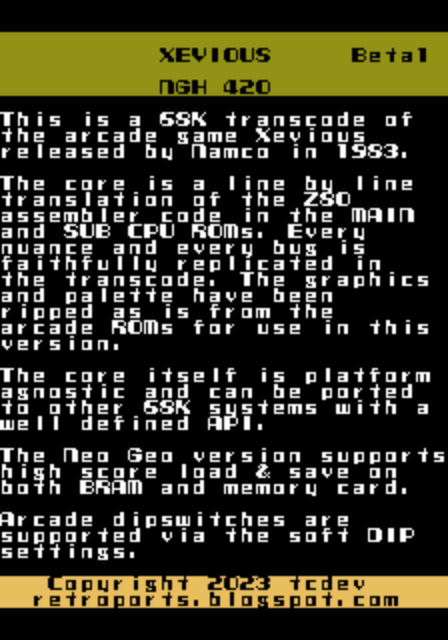
I've done up a quick splash screen. I'm not entirely happy with the aesthetics of it, and I actually can't reconcile the colours with the ones I thought I chose from the Xevious foreground palette, but it's a start.

Crude but conveys what I need to convey...

Back to the audit next session.

Thursday, 16 February 2023

Load/save to/from battery-backed RAM

Curiosity got the better of me and I started looking at saving to battery-backed RAM (aka BRAM, aka NVRAM). FTR MAME saves a copy for every ROM to the nvram directory.

Turned out to be trivial to implement.

First thing I discovered is that the BIOS loads the game data as specified in the header even before the cartridge executes any code. That means by simply setting the right header data the BIOS will automatically load save data from BRAM into my buffer (long before I hook to load from memory card). Half of the solution right there!

By using the same buffer as the memory card, and the same format - including the header - I can determine whether or not valid save data has been loaded, and skip patching the high scores if not. As for saving, I just copy data to my memcard buffer, and call $C12322 instead of saving to memory card. And that's all it takes!

I still need to work out a priority for reading/writing to BRAM/memory card, but that's also trivial.

UPDATE: seems not quite as trivial as I thought... calling the BRAM save routine is corrupting the title screen that follows the GAME OVER screen. I just can't see why... it's not calling any other function, and the registers are all saved in my routine...

UPDATE: the bug has nothing to do with the BRAM save routine; comment out the entire high score load/save routines and it still happens... another known bug (4)

Attract mode fixed, only to uncover more bugs in the process!

Well that opened a can of worms!

This morning I decided to fix the bug where the Solvalou moves very quickly in attract mode.

What I discovered wasn't great; I was treating the _dX,_dY values as bytes in some cases, and (correctly) as a word in other places! So first order of business was fixing all of those instances, and converting a dX,dY table for Solvalou movement from byte values to words.

That fixed the movement in attract mode, but I noticed it wasn't firing at all! Tracking that down uncovered another two (2) bugs; in some places I was reading the attract mode stage as a byte instead of a word, and in the case of generating a random shot to be fired, the random number was being treated as a byte instead of a word. So again, multiple instances that had to be fixed.

All byte/word issues. Makes me wonder how many more of these issues are waiting to be discovered?

Anyway, 5 from 8 bugs, 3 remaining. One of them may/may not be a bug - it was an observation when I was debugging the Neo Geo sprite implementation. I'll have to go back and recreate the conditions to see if it persists. The remaining 2 will be a bit more problematic I think; occasional bullets that just hang in the air, and extra Solvalou being awarded every hit.

But for now, on with the audit...

UPDATE: I've finished the 3rd device in the MAIN ROM, just one more to go...

Wednesday, 15 February 2023

Half-way through the MAIN program audit

Slow progress due to Real Life commitments, but progress none-the-less.

I'm now half-way through the MAIN program, working on all the flying object handlers now.

It has become apparent that the few small blocks of random data throughout the dump are simply padding to allow code to be modified/patched within a single device. Obvious now that I've noticed said blocks are right at the end of each device.

One of the remaining known bugs that I've noted in my note book is the observation that Jara morph into Toroids when they change direction. The problem is, I've just finished auditing the Jara handler code and I can't see any way this could happen. I originally suspected a simple transcode bug with the incorrect sprite code being set in the handler routine. It's not that though - in fact the Jara sprites come from a look-up table based off a timer value to animate them - and it's correct.

It's very unlikely that it's data corruption; once a handler is installed the object type in the object table is ignored. It would have to be the handler address being changed every time the Jara change direction, which isn't very likely.

Unfortunately the Jara aren't very common, so some creative patching might be required.

Something for lunchtime today...

UPDATE: Only 10 minutes to fix the Jara bug! Since Jara only appear later in the game, I simply patched the object table for the Toroids to jump to the Jara handler, so they appear immediately. Fortunately the morph bug was readily apparent; on Jara that started out moving to the left, then changed direction to move to the right (though curiously, not on Jara that started out moving right).

A simple transcode bug that went unnoticed during my audit - I was storing the sprite colour of any right-moving Jara in the _CODE offset rather then the _COLOUR offset in the object table.

So that's 3 of 8 down, 5 (known) bugs to go...

UPDATE: Another big fixed! Actually, it was 2 bugs which had the same ultimate effect - the Zakato wouldn't appear before it exploded. There are actually 4 different Zakato variants with slightly different behaviour. On one variant, the delta X value was inadvertantly written into the high byte, so it disappeared off the screen in 1 frame. On another variant, the instruction to set the sprite code was omitted completely.

So now that's 4 down, 4 (known) bugs to go...

Friday, 10 February 2023

High Score load/save!

Had an idea in the car on the way to work this morning - high score load/save.

At lunchtime I did more of the transcode audit; up to all the object routines now. They should be pretty quick to audit, except for the few which have known bugs.

Tonight at home I read up on the Neo Geo memory card routines. Fortunately they're pretty straightforward to understand and easy to use - it was harder working out how to use them with MAME.

Anyway the load/save has been implemented and tested! On startup the high scores will be read from the memory card (if the card is inserted and there is Xevious data on there of course). And whenever a new high score has been entered on the table, the table is written back to memory card. Easy as!

That's fine if you have a memory card, but some MVS systems supported battery-backed RAM instead. I can see MAME has automatically created it. I'll look at falling back to NVRAM if there is no memory card present.

Wednesday, 8 February 2023

The Bacura Hit-Box Mystery!

Since I've been inundated* with questions about the Bacura hit-box fix, I thought I'd write up a blog entry on it...

Xevious maintains a table of object variables including X & Y "world" coordinates, stored as 16-bit values. These values are scaled up from their sprite coordinates for various reasons I won't go into here.

Once a frame, the SUB CPU program iterates through the object table and updates a shadow copy of the hardware sprite registers in RAM. These shadow registers can then be efficiently block-copied to the sprite hardware registers during VBLANK. It goes without saying that the format of the these registers are the same as the hardware registers; in Xevious, the X register is 9 bits, and the Y register 8 bits.

During the course of the game, Xevious must calculate collisions between objects - bullets, bombs, enemies and the Solvalou - to determine which objects need to be destroyed. For efficiency reasons, (ie. to eliminate scaling and allow the use of 8 bit calculations), Xevious uses the sprite shadow registers in the hit-box calculations. In fact it shifts down the X coordinate to 8 bits in each calculation routine.

The problem with the Neo Geo transcode is that the sprite hardware X & Y registers are themselves shifted (up), not conducive to efficient calculations. Additionally, the X coordinate is adjusted for 2x2-tile sprites due to the way the sprites are implemented on the Neo Geo, which breaks the calculations (I found that out the hard way!)

As a result, the 68K transcode actually maintains 2 copies of the "shadow" registers (at least for X & Y); the 2nd being the same (actually, similar) format to the original registers. To make the hit-box calculations a little more efficient, I pre-shift the X coordinate down into 8 bits so it need not be done in every hit-box routine. Thus the hit-box calculation algorithms - magic numbers and all - are preserved in the transcode.

After checking the routine for the Bacura more than a few times, I was stumped as to where things were going wrong!?!

My intention was to compare values side-by-side between the original Xevious and the transcode. Patching the code to start on Area 3 and starting a game before the attract mode ran meant that each Bacura would appear in exactly the same spot at exactly the same time on each version.

First up - the original Xevious. With 4 Bacura on the screen I halted execution and looked at the Y coordinates for objects #16-19 in the object table. Since the screen is rotated, and Bacura move straight down the screen, the Y coordinate for each never changes, which makes things easy! I took note of those and then set a breakpoint in the routine that checked if the Solvalou has been hit by a Bacura.

Somewhat surprisingly, the value in the sprite shadow Y registers did not correspond to the Y coordinates in the object table (even taking the scaling into consideration)! And this was actually my first clue. But it was late, so I went to bed with a theory, but still guessing.

Next morning I had time to have a quick look at it again. Initially I was confused, as the update sprite shadow register routine appeared to just store the scaled value directly to shadow RAM. But then I noticed it was calling a routine to handle the screen flipping for a cocktail cabinet. The transcode does not support flipping - for obvious reasons - but I took another look at the Z80 routine. I did annotate that some time ago, but forgot that it adjusts both X & Y values even in the case that the screen ISN'T flipped for cocktail mode! And although the X value is simply incremented by 4 - which won't affect hit-box calculations - the Y value is actually SUBTRACTED from $EF, which certainly WILL affect the calculations!!! Eureka!

So I updated the transcode to apply both X & Y adjustments (for the sake of completeness) to the 2nd copy of the X & Y registers and now the hit-box for the Bacura is correct - yay!

Note that for 1x1-tile sprites, the calculations were still technically incorrect, but the difference was too subtle to notice during gameplay. I DID think that they were perhaps a pixel off as it's possible to bomb two adjacent objects at once if you aim just right, but then thought my memory was playing tricks. But with the 2x1-tile Bacura sprites, the difference was an entire sprite tile width - 16 pixels - impossible to miss!

Today with the 2nd of 8 known bugs fixed I forged ahead with the audit - mainly more micro-optimisations. FTR these micro-optimisations are things like using MOVEQ/ADDQ/SUBQ where possible, LEA instead of MOVEA.L, and small (byte) branches etc etc. I'm now exactly halfway through the 2nd ROM device (of four).

* this may not be the same meaning of the word you're used to!
Monday, 6 February 2023

Audit #7 - only 7 bugs remain (plus the others)

I've managed to complete a number of audit sessions since the last post, mainly micro-optimisations and annotation updates, but some bug fixes as well.

I have a list of eight (8) known transcode bugs in my notebook, and tonight I finally fixed one of them. The high score entry was working except in the case where the new score was the highest in the table; it wouldn't copy the new score or clear the name from the 1st entry (and in the process I added a build option to specify the starting score). Now there are 7 known bugs...

In my audit I'm currently looking at the routine that determines whether the Solvalou has been hit by a Bacura, which is another known bug - the hit box seemed to extend off the left-hand side of the Bacura. Upon closer inspection, after some experimentation, it is apparent that the hit box is shifted to the left. You can actually fly through the right-hand side of a Bacura.

I've checked the transcode of the routine several times now, and it looks OK. What's unique about the Bacura though is that it's the only flying object that is double height (width). I'd suspect a placement issue with the sprite (as - unlike ground objects - there's no reference to where it should be) but I don't seem to have placement or hit box issues on double height ground objects! Weird...

Because my intention is to perfect the transcode in a single audit pass, rather than press on with the audit I'm going to persist until I solve this mystery.

jotd is still working on the Amiga port, but bogged down with palette limitations on the machine. He's also unable to trigger a bomb, which is a bit odd; although I haven't had issues I can't rule out a bug on my part just yet?!?

UPDATE: Have to admit, the Bacura hit box issue is doing my head in. So I thought I'd post on my blog and hope for a Eureka moment?!? Hmm... waiting.... waiting....

Both the Solvalou and bullets have the same issue (different routines) so that would suggest a sprite placement issue. However there are 2 reasons this can't be the case: (a) the 2x2 sprites for ground-based objects are in the correct positions and (b) running the original Xevious and mine side-by-side shows the Bacura in exactly the same place at the same time. On mine, the Solvalou is destroyed by the 2nd Bacura on level 3, whilst on the original, it's destroyed by the 4th.

The Solvalou about to be destroyed by a Bacura that misses
- and rightly so - on the original arcade game.

At least the enemy placement is completely deterministic; starting a game from power-on before any demo can run will result in exactly the same sequence of enemies. This is because the pseudo-random number routine is never called outside a demo/game. This then means I can halt execution and inspect and compare values of the Bacura objects and sprite registers on both versions.

Fiddly but seemingly necessary now that I have no theory whatsoever...

UPDATE: Fixed the Bacura hit-box bug!!! 6 to go...